Trending
Gemini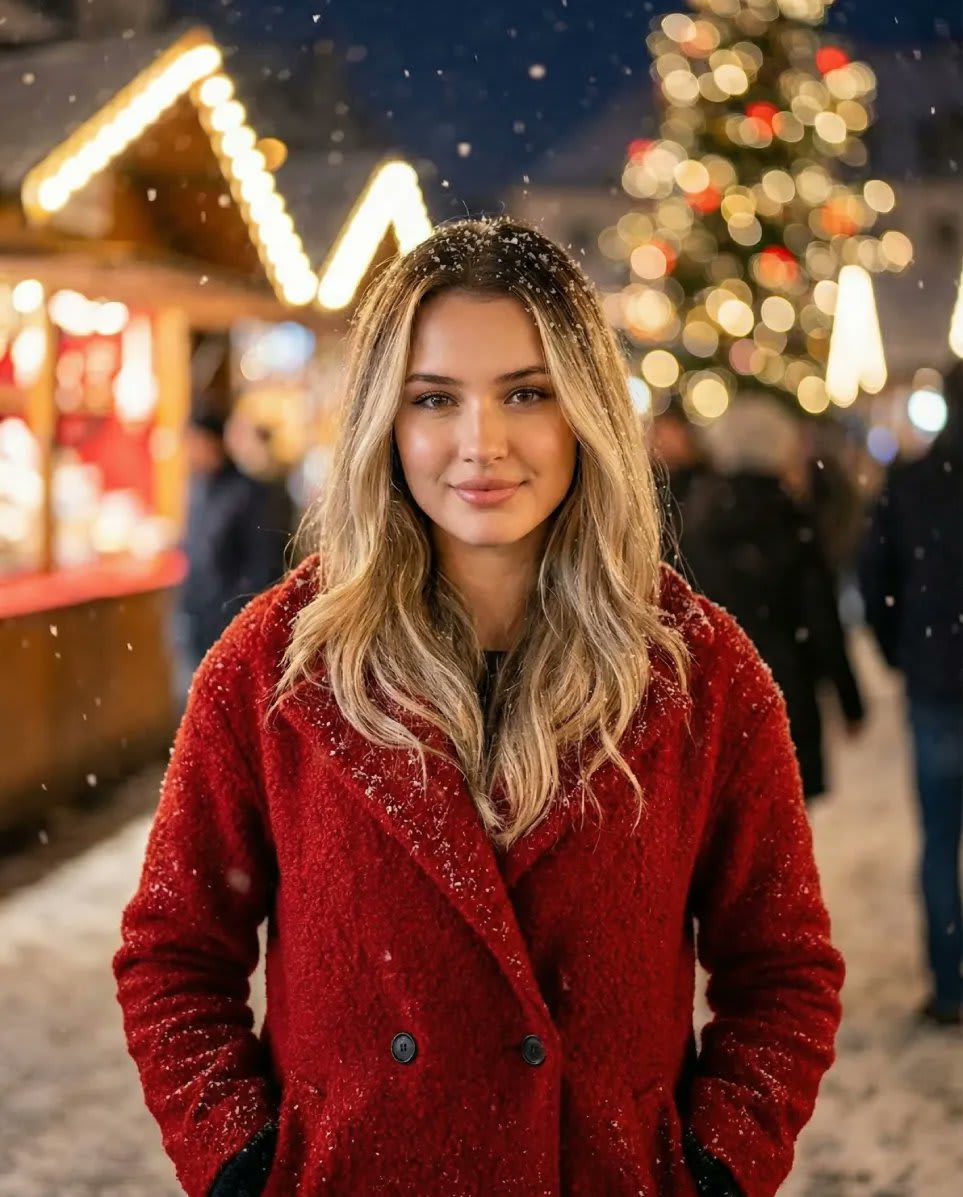
Use this prompt in Gemini to restyle your own photo as a cozy Christmas market portrait with identity preservation without losing your likeness. The prompt locks in the subject in a coat, falling snow and 85mm portrait lens and Kodak film tones, so you get a consistent, share-ready result. Identity-preservation wording is built in, so the edit changes the scene — not your face.
{ "prompt": { "scene": "Cinematic front-facing Christmas market portrait captured outdoors at night with softly falling snow.", "subject": { "identity": "Preserve all facial features exactly as in uploaded image", "pose": "Standing upright, centered in frame, facing the camera directly", "attire": { "outerwear": "{argument name="coat color" default="Red"} winter coat, cozy and fitted, with visible texture", "accessories": ["Matching scarf optional", "Gloves optional"] }, "hair": "Natural hair with snowflakes gently resting on strands", "expression": "Neutral, relaxed, softly smiling or calm" }, "environment": { "weather": "Soft snow falling, snow accumulating lightly on coat and hair", "lighting": "Warm ambient Christmas market lights, softly illuminating subject and background", "background_elements": [ "Decorated Christmas tree with glowing ornaments", "Bokeh of market stalls and festive lights", "Softly blurred pedestrians or distant decorations" ] }, "camera": { "angle": "Front-facing, eye-level", "framing": "Centered medium shot capturing subject from head to mid-thigh", "lens": "{argument name="lens" default="85mm"} portrait lens", "aperture": "{argument name="aperture" default="f/1.8"} for shallow depth of field", "focus": "Sharp focus on subject, softly blurred background", "resolution": "4K", "color_tone": "Warm, cozy, festive glow" }, "style": "Ultra-realistic cinematic photography, soft winter tones, festive mood", "mood": "Cozy, elegant, holiday-inspired, softly illuminated nighttime scene", "constraints": [ "Preserve all facial features and identity from uploaded reference", "Do not alter hair style or face", "Ensure snowflakes appear natural on coat and hair" ] } }
Copy the prompt
Tap "Copy prompt" to copy all 217 words exactly as written.
Upload your photo
Open Google Gemini (gemini.google.com) and pick Nano Banana / "Create image", tap the + button and attach one sharp, well-lit photo where your face is clearly visible.
Paste and generate
Paste the prompt and send it.
Refine with follow-ups
Ask for small changes in the same chat — "make the lighting warmer" or "change the outfit colour to black" — instead of rewriting the prompt.
Pro tip: A highly structured JSON prompt for Google Nano Banana Pro designed to generate an ultra-realistic, cinematic portrait of a subject in a Christmas market setting. The prompt explicitly requires preserving the subject's facial features from a reference image while adding festive elements like a red winter coat, falling snow, and warm market lighting.
Yes. You can copy the full cozy Christmas market portrait with identity preservation prompt on Hixa for free and use it in Google Gemini, ChatGPT or any other AI image tool. No signup is needed.
It is written to keep your facial features, skin tone and expression the same as your uploaded photo. For the best likeness, use a sharp, front-facing photo in good light. If the face drifts, reply with "keep my face exactly the same as the uploaded photo".
It is written for Google Gemini's Nano Banana Pro image model. It also works in ChatGPT image generation and most modern AI image tools, though results vary between models.
Use 4:5 for Instagram feed posts, 9:16 for Reels and Stories, and 16:9 for YouTube thumbnails. Add the ratio at the end of the prompt.
Similar styles people copy with this one

 Gemini
 Gemini
 Gemini
 Gemini
 Gemini
 Gemini
 Gemini
 Gemini
 Gemini
 Gemini