Trending
GeminiStreet Fashion Model Shop Window Cartoon Reflection
Anime & Cartoon
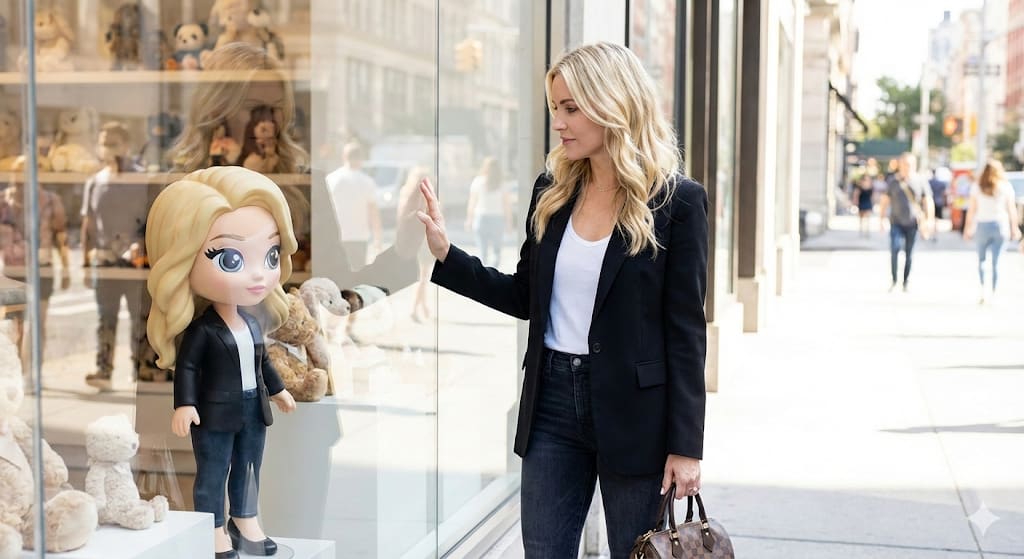
Use this prompt in Gemini to restyle your own photo as a luxury shop window cartoon reflection without losing your likeness. The prompt locks in a woman as the main subject and a city street, so you get a consistent, share-ready result. Identity-preservation wording is built in, so the edit changes the scene — not your face.
{ "PROMPT": "Create a bright, high-end street-fashion photograph of the woman from the reference image, keeping her face, hair, body & outfit exactly the same. She stands outside a luxury toy-shop window, gently touching the glass. Inside the window display, place a full-height cartoon-style doll designed to resemble her—same features, hair, and outfit—transformed into a cute, big-eyed, stylized animated character. Crisp lighting, premium street-fashion look, realistic reflections, face unchanged.", "settings": { "style": "high-end street fashion", "lighting": "crisp and bright", "environment": "outside luxury toy-shop window", "subject": "woman from reference image", "focus": [ "face", "hair", "body", "outfit" ], "additional_elements": [ { "type": "doll", "style": "cartoon-style, big-eyed, stylized", "location": "inside window display", "resemblance": "exact features, hair, outfit of woman" } ], "reflections": "realistic", "photorealism": true } }
Copy the prompt
Tap "Copy prompt" to copy all 124 words exactly as written.
Upload your photo
Open Google Gemini (gemini.google.com) and pick Nano Banana / "Create image", tap the + button and attach one sharp, well-lit photo where your face is clearly visible.
Paste and generate
Paste the prompt and send it. Ask for a 4:5 aspect ratio if the tool does not pick it automatically.
Refine with follow-ups
Ask for small changes in the same chat — "make the lighting warmer" or "change the outfit colour to black" — instead of rewriting the prompt.
Pro tip: Copy this JSON schema directly into Google Gemini (Nano Banana Pro). You can customize specific fields such as subject, lighting, attire, or camera lens to generate unique high-fidelity variations.
Yes. You can copy the full shop window cartoon reflection prompt on Hixa for free and use it in Google Gemini, ChatGPT or any other AI image tool. No signup is needed.
It is written to keep your facial features, skin tone and expression the same as your uploaded photo. For the best likeness, use a sharp, front-facing photo in good light. If the face drifts, reply with "keep my face exactly the same as the uploaded photo".
It is written for Google Gemini's Nano Banana Pro image model. It also works in ChatGPT image generation and most modern AI image tools, though results vary between models.
The prompt is designed for 4:5. Use 4:5 for Instagram feed posts and 9:16 for Reels or Stories.
Similar styles people copy with this one
 Gemini
 Gemini
 Gemini
 Gemini
 Gemini
 Gemini
 Gemini