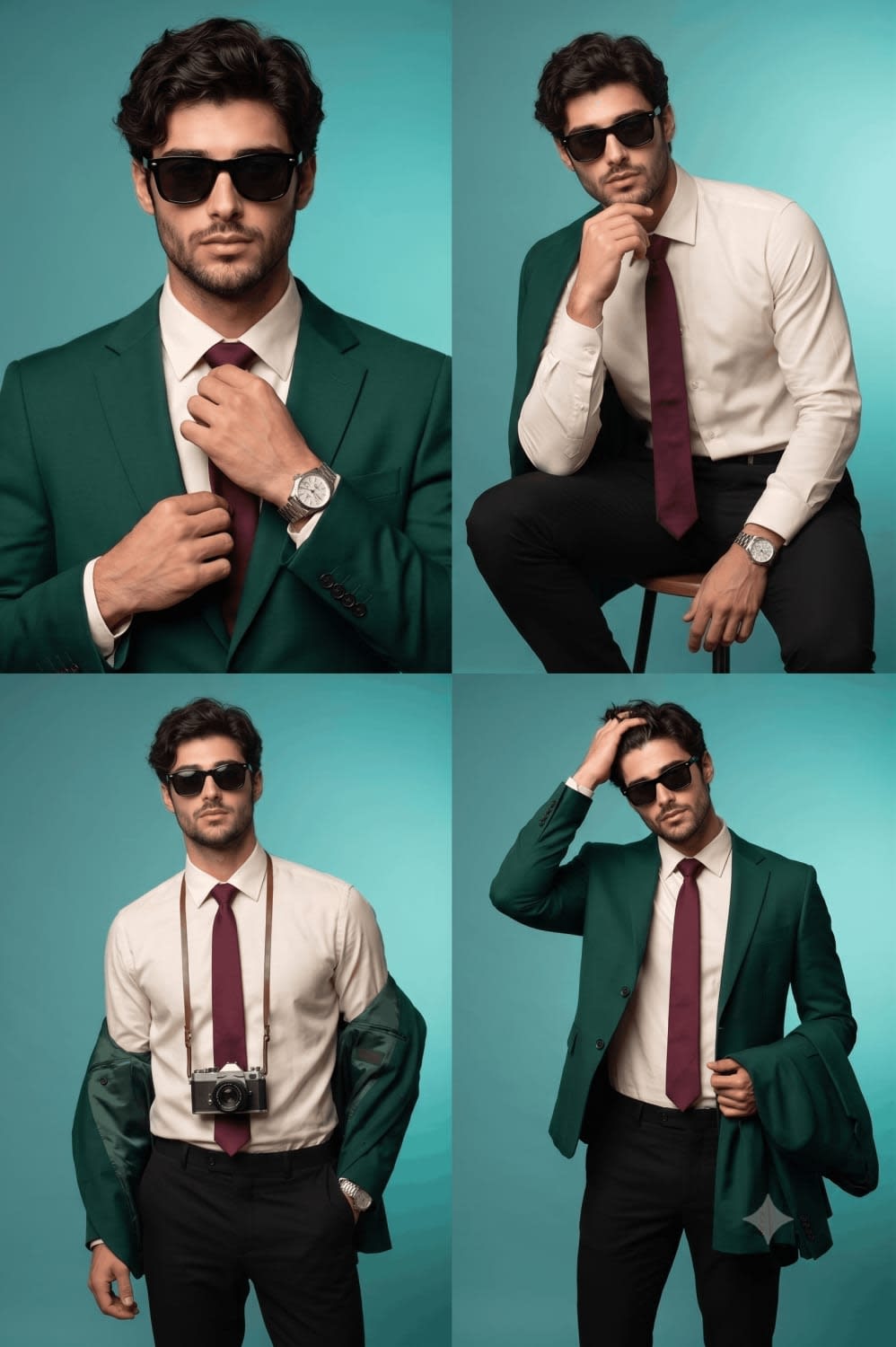
Emerald Blazer GQ Studio Editorial 2×2 Grid Portrait – in a photo studio, AI image made with Nano Banana Pro
Example output · Nano Banana ProCredit: Hixa Editorial Team

Emerald Blazer GQ Studio Editorial 2×2 Grid Portrait Prompt

This Gemini photo editing prompt turns one clear photo of you into an emerald blazer GQ studio editorial 2×2 grid portrait. It spells out the subject in a blazer, a photo studio, clean studio lighting and rim lighting and 85mm portrait lens and Kodak film tones, which is why the result looks like a real photograph rather than a generic AI image. Identity-preservation wording is built in, so the edit changes the scene — not your face.

2:2 215 words Needs your photo

Emerald Blazer GQ Studio Editorial 2×2 Grid Portrait prompt text

Copy & paste

Using the uploaded reference photo as the identity, create a professional studio fashion photoshoot arranged as a clean 2×2 grid collage, showing four poses of the same person wearing black sunglasses throughout. Outfit: a deep emerald green tailored blazer, cream/off-white dress shirt, black slim trousers, burgundy tie, and an optional silver watch — the blazer appears differently in each frame (worn, draped over one shoulder, partially removed, held in hand). Background: a clean teal-to-turquoise gradient studio backdrop in a minimal fashion studio setting. Top-left: close portrait, hands adjusting the tie. Top-right: seated editorial pose, leaning forward with an elbow resting on the knee. Bottom-left: relaxed pose with a vintage camera hanging around the neck. Bottom-right: stylish pose running a hand through the hair while holding the blazer. Lighting: professional three-point studio lighting — a softbox key light at 45° camera left, a soft fill light camera right, and a subtle rim light behind the subject. Camera: Sony A7R V, 85mm portrait lens, f/2.2, ISO 100, 1/160s, white balance 5600K, shallow depth of field with focus locked on the eyes. Realism: natural skin pores, individual hair strands, subtle fabric wrinkles, realistic shadows, natural lens compression, and visible reflections in the sunglasses. Output: ultra-realistic GQ/Vogue-style editorial photography, sharp detail, 4K resolution, in a clean 2×2 grid layout.

How to use this prompt

  1. 1

    Copy the prompt

    Tap "Copy prompt" to copy all 215 words exactly as written.

  2. 2

    Upload your photo

    Open Google Gemini (gemini.google.com) and pick Nano Banana / "Create image", tap the + button and attach one sharp, well-lit photo where your face is clearly visible.

  3. 3

    Paste and generate

    Paste the prompt and send it. Ask for a 2:2 aspect ratio if the tool does not pick it automatically.

  4. 4

    Refine with follow-ups

    Ask for small changes in the same chat — "make the lighting warmer" or "change the outfit colour to black" — instead of rewriting the prompt.

Make it your own

  • Outfit: replace "blazer" with a trench coat or a knit polo.
  • Location: swap a photo studio for a snowy Manali hillside.
  • Lighting: try golden-hour light instead of clean studio lighting for a different mood.
  • Format: use 9:16 instead of 2:2 for Instagram Reels and Stories.

Pro tip: Grid collages drift the face across panels. Say all four poses must match the same reference identity, and keep the lighting setup identical in every frame.

Emerald Blazer GQ Studio Editorial 2×2 Grid Portrait prompt — FAQ

Is the emerald blazer GQ studio editorial 2×2 grid portrait prompt free?

Yes. You can copy the full emerald blazer GQ studio editorial 2×2 grid portrait prompt on Hixa for free and use it in Google Gemini, ChatGPT or any other AI image tool. No signup is needed.

Will this prompt change my face?

It is written to keep your facial features, skin tone and expression the same as your uploaded photo. For the best likeness, use a sharp, front-facing photo in good light. If the face drifts, reply with "keep my face exactly the same as the uploaded photo".

Which AI tool works best for this prompt?

It is written for Google Gemini's Nano Banana Pro image model. It also works in ChatGPT image generation and most modern AI image tools, though results vary between models.

What aspect ratio should I use?

The prompt is designed for 2:2. Use 4:5 for Instagram feed posts and 9:16 for Reels or Stories.

More scrapbook collage prompts

Similar styles people copy with this one

View all
Nine-Frame Fashion Portrait Collage – woman in streetwear in a photo studio, AI image made with Nano Banana Pro
Trending
Gemini
Dark Cinematic Diary Collage – man in a hoodie in a city street, AI image made with Nano Banana Pro
Gemini

Dark Cinematic Diary Collage

Scrapbook Collage
Cinematic Male Editorial Collage – man in a t-shirt in a city street, AI image made with Nano Banana Pro
Gemini
Luxury Night Fashion Moodboard (Day 2) – woman in a dress in a beach, AI image made with Nano Banana Pro
Gemini
Cyberpunk Fashion Portrait Collage – man in a kurta in a rainy street, AI image made with Nano Banana Pro
Gemini
Monochrome Fashion Editorial Multi-Frame Collage – man in a dress in a photo studio, AI image made with Nano Banana Pro
Gemini
Neo-Noir Editorial Collage – man in a trench coat in falling snow, AI image made with Nano Banana Pro
Gemini

Neo-Noir Editorial Collage

Scrapbook Collage
Paper-Collage Countryside Portrait – woman in a forest, AI image made with Nano Banana Pro
Trending
Gemini
Luxury Editorial Korean Woman Collage – woman in a dress in an open field, AI image made with Nano Banana Pro
Gemini
Urban Mixed-Media Portrait with Ink and Collage, AI image made with Nano Banana 2
Gemini
Y2K K-Pop Digital Scrapbook Collage – woman in denim, AI image made with Nano Banana Pro
Trending
Gemini
Golden Field Photo Collage – woman in an open field, AI image made with Nano Banana Pro
Trending
Gemini

Golden Field Photo Collage

Scrapbook Collage