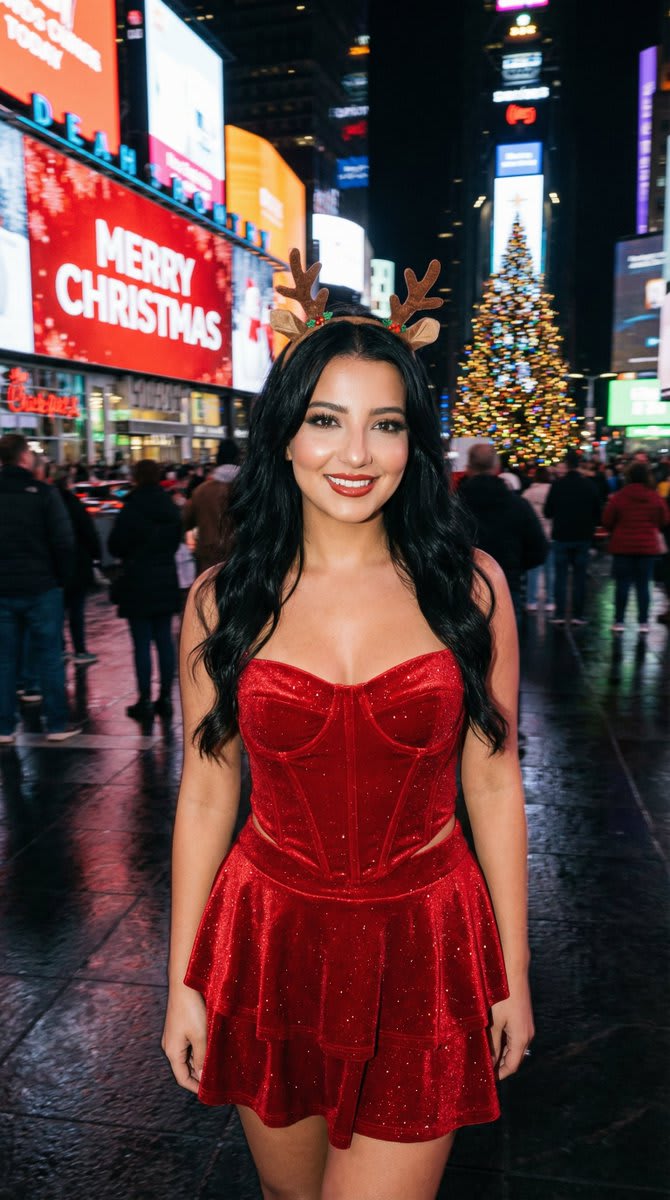
Christmas Flash Photo in Times Square with Motion Blur – woman in a corset in a photo studio, AI image made with Nano Banana
Example output · Nano Banana ProCredit: Özge Döner

Christmas Flash Photo in Times Square with Motion Blur Prompt

This Nano Banana Pro prompt generates a candid Christmas flash photo in times square with motion blur from text alone — no reference photo needed. The prompt locks in the woman in a corset, a photo studio, direct on-camera flash and smartphone-camera look, so you get a consistent, share-ready result. Change one detail at a time — outfit, place or light — to get endless variations.

3:4 380 words

Christmas Flash Photo in Times Square with Motion Blur prompt text

Copy & paste

{ "aspect_ratio": "3:4", "style_and_setting": "A candid on-camera flash photograph taken at night in New York City's Times Square during the Christmas season. Real smartphone/compact-camera flash vibe, high realism, natural grain, authentic nightlife atmosphere.", "subject_appearance": "The central subject is a young woman with long wavy BLACK hair (glossy, healthy volume). She wears a sparkling red velvet corset top with a pointed hem, a matching tiered mini skirt, and a small stylish reindeer antler headband.", "pose_and_expression": "She holds a natural, fun pose with a warm, closed-mouth smile, looking directly into the camera. Confident, attractive, model-like presence while staying photoreal (no uncanny beauty filter).", "makeup": { "style": "SOFT SMOKY GLAM (NOT heavy)", "eyes": "soft charcoal-brown smoky eyeshadow with a gentle gradient, lightly blended (not blown out too far), subtle shimmer optional", "liner": "thin-to-medium black eyeliner with a small refined wing, tightlined upper lash line", "lashes": "defined lashes with mascara (optional light wispy falsies, not dramatic)", "brows": "natural-clean shaping, softly defined", "skin": "flash-friendly glow with real texture (no plastic smoothing), subtle highlight on cheekbones", "lips": "warm red lips (satin to soft gloss), clean edges but not overdrawn" }, "background_elements": "The background features giant LED screens and holiday signage. One prominent screen displays bright 'MERRY CHRISTMAS' text against a red background. Other surrounding screens display Christmas themes heavily weighted with red, blue, and green colors. A large, brilliantly illuminated Christmas tree with ornaments is visible in the scene.", "lighting_and_atmosphere": "The overall atmosphere is darker with heavy cinematic motion blur in the background, turning LED screens, traffic, and crowds into streaking lines of color. The on-camera flash freezes the subject perfectly: face and outfit tack-sharp, clean flash catchlights in the eyes, soft flash highlights on skin. Wet pavement reflects the blurred streaks of light. Colors remains harmonious and believable.", "camera_notes": { "capture_style": "handheld candid flash photo", "focus": "subject perfectly sharp; background strongly motion-blurred", "grain": "natural low-light grain", "no_ai_look": "avoid overly clean studio look" }, "strict_rules": [ "Photoreal flash realism", "Hair must be BLACK and wavy", "Makeup must be SOFT smoky glam (NOT heavy)", "Subject sharp; background heavy motion blur", "No watermark, no extra text overlay beyond the existing Times Square screen content" ], "negative_prompt": [ "watermark", "logo", "extra overlay text on the image", "cartoon", "anime", "cgi look", "plastic skin", "over-smoothed face", "beautify filter", "identity drift", "blond"

How to use this prompt

  1. 1

    Copy the prompt

    Tap "Copy prompt" to copy all 380 words exactly as written.

  2. 2

    Open Gemini

    Open Google Gemini (gemini.google.com) and pick Nano Banana / "Create image". No reference photo is required for this prompt.

  3. 3

    Paste and generate

    Paste the prompt and send it. Ask for a 3:4 aspect ratio if the tool does not pick it automatically.

  4. 4

    Refine with follow-ups

    Ask for small changes in the same chat — "make the lighting warmer" or "change the outfit colour to black" — instead of rewriting the prompt.

Make it your own

  • Outfit: change the corset colour or fabric to match your style.
  • Location: swap a photo studio for a rainy Mumbai street.
  • Lighting: try golden-hour light instead of direct on-camera flash for a different mood.
  • For a boys version, change "woman/girl" to "man/boy" and adjust the outfit wording.

Pro tip: A highly structured prompt for generating a photorealistic, candid flash photograph taken at night in Times Square during Christmas. It specifies the subject's appearance (black wavy hair, red velvet outfit, soft smoky glam makeup) and uses heavy cinematic motion blur in the background (LED screens, traffic) contrasted with a tack-sharp, flash-frozen subject.

Christmas Flash Photo in Times Square with Motion Blur prompt — FAQ

Is the Christmas flash photo in times square with motion blur prompt free?

Yes. You can copy the full Christmas flash photo in times square with motion blur prompt on Hixa for free and use it in Google Gemini, ChatGPT or any other AI image tool. No signup is needed.

Which AI tool works best for this prompt?

It is written for Google Gemini's Nano Banana Pro image model. It also works in ChatGPT image generation and most modern AI image tools, though results vary between models.

What aspect ratio should I use?

The prompt is designed for 3:4. Use 4:5 for Instagram feed posts and 9:16 for Reels or Stories.

Can I use this prompt for boys?

Yes. Replace the gendered words (for example "woman") and adjust the outfit description. The lighting, camera and scene details work for anyone.

More christmas prompts

Similar styles people copy with this one

View all
Y2K Flash Portrait at Christmas Cafe – woman in a leather jacket in a cosy cafe, AI image made with Nano Banana Pro
Gemini
Chibi Christmas City Portrait – woman in a city street, AI image made with Nano Banana Pro
Trending
Gemini
Early 2000s Digital Camera Santa Outfit Portrait – woman in a jacket, AI image made with Nano Banana Pro
Gemini
Photorealistic Christmas DJ Editorial – woman in a corset in falling snow, AI image made with Nano Banana Pro
Gemini
Add Santa Hat to Profile Picture (Image-to-Image), AI image made with Nano Banana Pro
Gemini
Cozy Christmas Morning Portrait with Cat – woman, AI image made with Nano Banana Pro
Gemini
Christmas Selfie in a Decorated Bathroom Mirror – in a bathroom, AI image made with Nano Banana Pro
Gemini
Christmas Vertigo: Surreal Avant-Garde Mrs. Claus – woman in a coat in falling snow, AI image made with Nano Banana Pro
Gemini
9-Grid Minimalist Christmas Portrait – woman in a t-shirt in a photo studio, AI image made with Nano Banana Pro
Gemini
Fantasy Christmas Sleigh Pulled by Wolves – woman in a forest, AI image made with Nano Banana Pro
Gemini
Glamorous Santa Holiday Studio Portrait – woman in a dress in a photo studio, AI image made with Nano Banana Pro
Gemini
Christmas Box Challenge Photo Collage – woman in a sweater in falling snow, AI image made with Nano Banana Pro
Gemini